What is a Case Converter Tool?
A case converter tool is a simple, web-based utility designed to change the capitalization (or “case”) of any given text instantly. Instead of manually deleting and retyping letters to capitalize them or make them lowercase, you simply paste your text into the tool, click a button, and the software automatically transforms it into your desired format.
Whether you need a quick uppercase lowercase converter for an essay, want to seamlessly capitalize titles, or require a more complex formatting solution for programming code, this tool automates the tedious parts of text editing. Because it runs in your browser, you can convert text case online from any device, anywhere, without installing heavy software.
Why it is Important: Real-World Use Cases
You might be wondering, “Do I really need a dedicated tool just to capitalize letters?” If you work with text or code on a daily basis, the answer is a resounding yes. Here is how different professionals rely on this text formatting tool:
Bloggers and Content Creators: When writing articles, maintaining consistent heading styles is crucial for readability. A case converter ensures all your H2 and H3 subheadings properly capitalize words in perfect Title Case or Sentence case in seconds.
Software Developers and Programmers: Coding requires strict naming conventions. Developers frequently need to convert raw text into camelCase for JavaScript variables, snake case for Python functions, or kebab-case for CSS class names.
Students and Academics: Students writing essays often paste quotes or citations from various sources, leading to messy formatting. A quick conversion helps standardize the text and automatically capitalize sentences to match their university’s style guide.
SEO Writers and Marketers: Meta titles and ad copies perform better when you capitalize the right words. A case converter helps SEO experts draft eye-catching, perfectly formatted title tags without manual checking.
Internal Linking Suggestion: If you are finalizing an essay or an SEO article, optimizing your text is only half the battle. Be sure to track your length and keyword density using our free Word Counter Tool. https://uktoolkithub.com/free-word-count-tool-fast-accurate-online-counter/
Features of the Tool Master Case Converter
The Tool Master Case Converter is built to be a true all-in-one solution. As you can see from our user-friendly interface, we support a wide variety of text transformations. Let’s break down exactly how each feature helps you capitalize and format your text:
1. UPPER CASE
This feature will capitalize every single letter in your text, transforming it into block capitals.
Example: make this loud becomes MAKE THIS LOUD.
Best for: Warning labels, strong emphasis, or drafting eye-catching
graphics.
2. lower case
This strips away all capital letters, making every character small. It reverses any text you accidentally managed to capitalize.
Example: Please DO NOT shout becomes please do not shout.
Best for: Fixing accidental Caps Lock mistakes or creating casual, aesthetic social media captions.
3. Title Case
This will capitalize the very first letter of every single word in your text.
Example: the lord of the rings becomes The Lord Of The Rings.
Best for: Book titles, movie names, and main blog post headings (H1).
4. Sentence case
This acts like standard paragraph formatting. It will capitalize the first letter of the first word in a sentence and leave the rest in lowercase (except for proper nouns that you may need to adjust later).
Example: hello world. it is a great day. becomes Hello world. It is a great day.
Best for: Standard body text, emails, and conversational writing.
5. camelCase
A staple for developers! This removes all spaces and will capitalize the first letter of every word except the very first word.
Example: user login count becomes user Login Count.
Best for: Naming variables and functions in programming languages like JavaScript, Java, and C++.
6. PascalCase
Similar to camelCase, but it will capitalize the first letter of every word, including the first one, while removing spaces.
Example: account controller becomes Account Controller
Best for: Naming classes and constructors in object-oriented programming.
7. snake_case
This replaces all spaces with underscores (_) and makes all letters lowercase.
Example: database connection string becomes
database_connection_string
Best for: Naming variables in Python, Ruby, and standardizing database column names.
8. kebab-case
This replaces all spaces with hyphens (-) and keeps all letters lowercase.
Example: primary navigation menu becomes primary-navigation- menu.
Best for: Creating SEO-friendly URLs, naming CSS classes, and HTML IDs.
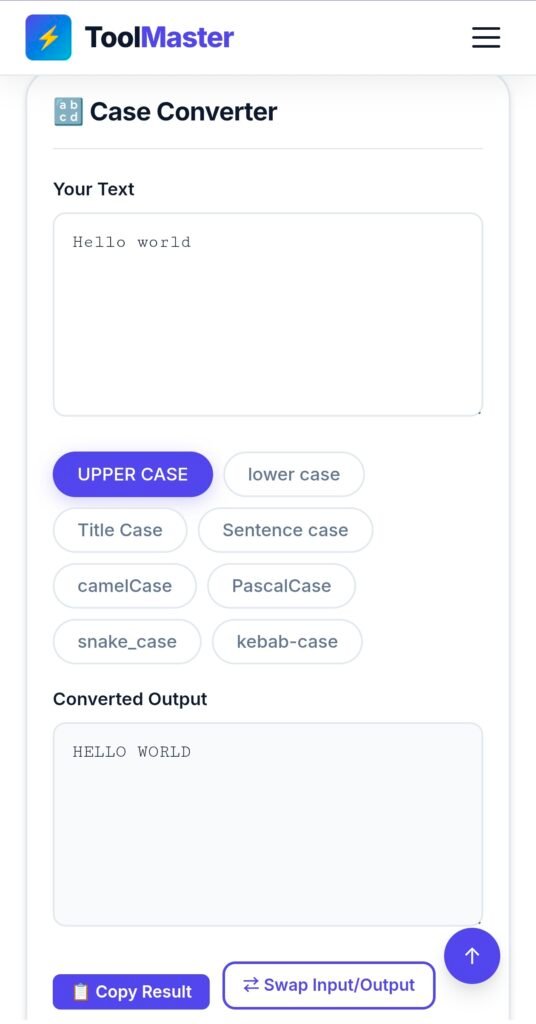
A user automatically capitalizing text to Title Case using the Tool Master Case Converter Tool online.
How to Use the Tool (Step-by-Step)
Using the Tool Master case converter tool is incredibly straightforward. It requires zero technical knowledge to properly capitalize your text. Here is how you can reformat your work in seconds:
Paste or Type Your Text: Locate the top text box labeled “Your Text”. Type out your text or paste the messy, unformatted text you copied from another document.
Select Your Format: Look at the grid of pill-shaped buttons below the input box. Click the button that matches how you want to capitalize or format your text (e.g., “Sentence case”, “snake_case”, “UPPER CASE”).
View the Magic: Instantly, your newly formatted text will appear in the bottom box labeled “Converted Output”.
Copy and Go: Click the purple “Copy Result” button to automatically copy the newly formatted text to your clipboard. You can now paste it directly into your Word document, code editor, or CMS.
Bonus Features: If you need to manipulate the text further, you can use the “Swap Input/Output” button to move your result to the top box. If you want to start fresh, simply click the “Clear” button.
Benefits of Using an Online Case Converter
If you are still on the fence about keeping a convert text case online bookmark on your browser, consider these massive benefits when you need to capitalize text:
Lightning Fast Speed: What takes five minutes to retype takes a fraction of a second to convert. Over a week, this saves hours of administrative busywork.
Flawless Accuracy: Humans make mistakes. When retyping a paragraph to capitalize specific words, you might misspell a word or miss a comma. A digital tool guarantees 100% accuracy based on your original input.
Boosted Productivity: Every time you stop to fix formatting, you lose your train of thought. By relying on a tool, you keep your momentum going, allowing you to focus on the actual quality of your writing or code.
Comparison: Manual Formatting vs Tool Master
Still think manually trying to capitalize words is just as good? Let’s look at a quick comparison when dealing with a 500-word block of accidentally capitalized text:
| Feature | Manual Formatting | ToolMaster Tool |
|---|---|---|
| Time Required | 5–10 minutes | Under 2 seconds |
| Effort Level | High | Extremely Low |
| Risk of Typos | High | Zero |
| Cost | Your time | 100% Free |
Common Mistakes to Avoid When Formatting Text
While our tool is powerful, it is important to know when to use which format. Here are a few common pitfalls writers and developers should avoid:
Using UPPERCASE for entire articles: IT LOOKS LIKE YOU ARE YELLING AT THE READER. Reserve all-caps for acronyms (like NASA), short warnings, or very specific design choices.
Forgetting Proper Nouns in Sentence Case:
When you convert text to “lower case” or “Sentence case”, the tool brings everything down. Remember to manually capitalize proper nouns (names of people, cities, brands) afterward.
Mixing up Coding Cases: If your development team uses camelCase for JavaScript, do not suddenly submit code using snake_case. Consistency is the golden rule of clean code
Pro Tips for Writers & Developers
For Writers and SEO Experts: Consistency makes your site look professional. Establish a style guide for your blog. For example, decide that all H1 tags will heavily capitalize words using Title Case, and all H2/ H3 tags will use Sentence case. When writing Meta Titles, always use Title Case, as properly capitalized titles have been proven to yield higher click-through rates (CTR) on Google search engine results pages.
For Programmers:
Keep the Tool Master tab open while writing code documentation. Often, you’ll need to turn a conversational sentence like “fetch user data” into a usable function like fetch User Data(). Using the tool saves you from navigating with arrow keys to manually delete spaces and capitalize specific letters.
Frequently Asked Questions (FAQs)
1. Is the ToolMaster Case Converter completely free?
Yes! Our tool is 100% free to use. There are no hidden fees, subscriptions, or daily limits. You can capitalize and convert text as many times as you need.
2. How do I capitalize the first letter of every word?
To instantly capitalize the first letter of every single word in a sentence, simply paste your text into the tool and click the “Title Case” button.
3. What is the difference between Title Case and Sentence case?
Title Case will capitalize the first letter of almost every word (e.g., The Quick Brown Fox), which is great for headings. Sentence case will only capitalize the first letter of the very first word (e.g., The quick brown fox), which is how standard paragraphs are written.
4. Can I use this tool for coding variables?
Absolutely. We specifically included developer-friendly options like camelCase, PascalCase, snake_case, and kebab-case to make programming faster and easier without manually needing to capitalize middle words
Ready to Save Time? Try It Now!
Why struggle with the Backspace key when you have the ultimate text formatting tool right at your fingertips? Whether you need to fix a massive Caps Lock error, automatically capitalize your next viral blog post, or write clean code, ToolMaster is here to help.
Scroll up to the top of the page, paste your text, and experience the easiest uppercase lowercase converter on the web.