What Exactly is a Word Count Tool?
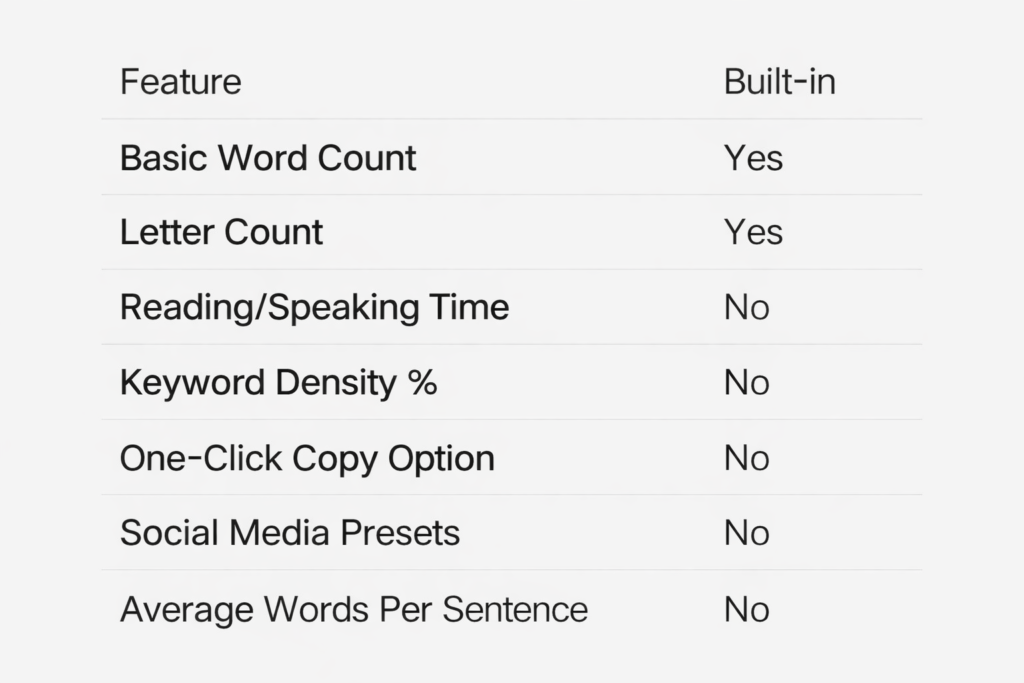
At its core, a word count tool is a digital utility designed to calculate the word tally, letter count, sentences, and paragraphs in a piece of text. While most word processors like Microsoft Word or Google Docs have built-in counters, dedicated online tools offer much more than just a simple count.
Modern real-time writing tools provide deep insights into:
Total Word Count: The number of individual words in your draft.
Character Counter: Calculating the character count with spaces and without (vital for social media and meta tags).
Estimated Reading Time: How long it will take an average reader to consume your content.
Estimated Speaking Time: Essential for scriptwriters, podcasters, and public speakers.
Keyword Density Percentage: How often specific phrases appear relative to the total length.
For SEO writers and students alike, these metrics are the difference between a piece of content that “works” and one that fails to meet the requirements of the algorithm or the professor.
Why Every Writer Needs a Reliable Word Tally
You might think, “I can just see the word count in my doc, why do I need a specialized tool?” The reality is that professional writing requires a level of detail that standard word processors often overlook.
1. Long-Form Content Strategy and SEO
Search engines have preferences. While Google doesn’t have a “strict” word count requirement, data shows that a long-form content strategy (usually 1,500–2,500 words) tends to rank higher for competitive keywords. A word count tool helps you avoid the dreaded thin content penalty. A word counter keeps you in the “safe zone” for ranking by ensuring you hit the depth needed for content readability.
2. Meeting Academic and Professional Standards
Students are often given strict assignment word limits—for example, a 1,500-word essay with a 10% margin. Going over or under can result in lost marks. Similarly, a dissertation word count can reach 15,000 words, where tracking progress daily is the only way to stay sane.
Essential Features: The Power of the “Copy Option”
If you are looking for the perfect tool, don’t settle for a basic box. A professional-grade word count tool should offer features that streamline your workflow:
One-Click “Copy to Clipboard” Functionality
A feature often overlooked but highly valuable is the copy option. Once you have finished editing and counting your text, you shouldn’t have to manually select the text with your mouse. A single button that utilizes copy-to-clipboard functionality allows you to move your content seamlessly from the tool into your CMS (like WordPress), email, or social media scheduler. This minimizes formatting errors and saves precious seconds during a busy workday.
Real-Time Writing Feedback
You shouldn’t have to click “submit” or “process” every time you add a sentence. The numbers should update dynamically as you type, allowing you to see your word tally grow in real-time.
Keyword Density Analysis
This is a “must-have” for on-page SEO optimization. It prevents “keyword stuffing” by showing you the percentage of times your focus keyword appears. Most experts recommend a density of 1% to 2% to maintain high content readability.
Comparison: Online Word Count Tools vs. Built-in Processors
Word Count Best Practices for Every Use Case
Depending on your goal, your target length will vary. Here is a breakdown of how to use a word count tool to meet industry standards.
For Bloggers and SEO Writers
Meta Description Length: Keep this between 150–160 characters.
Standard How-To Blog Posts: 1,000–1,500 words for better depth.
Pillar Content: 2,500+ words to establish authority.
For Students and Academics
Personal Statement Character Limit: Usually capped at 4,000 characters.
Strategy: Use the “paragraph count” feature to ensure your essay structure is balanced.
For Social Media Managers
Twitter (X) Character Limit: 280 characters.
Instagram Caption Length: 2,200 characters.
Strategy: Focus on the character count with spaces metric.
Internal Linking Suggestions
Link to “https://uktoolkithub.com/word-counter/” when discussing SEO strategy.
Frequently Asked Questions (FAQ)
1. Does Google care about word count for SEO?
While Google does not have a specific “word count” ranking factor, it does prioritize “helpful, in-depth content.” Using a word count tool helps you ensure your content is comprehensive enough to answer a user’s query compared to your competitors.
2. Is a word count tool more accurate than Google Docs?
Yes, many dedicated text counters online are more accurate for SEO because they can be configured to ignore headers, footers, or citations, giving you a “clean” count of your actual body text.
3. What is the benefit of a “copy option” in a word count tool?
The copy option allows you to move your text with one click. This is much faster and more accurate than manually highlighting large blocks of text, especially on mobile devices where selecting text can be clunky.
4. How many words is a 5-minute read?
The average person reads at about 200–250 words per minute. Therefore, a 5-minute read is typically between 1,000 and 1,250 words.
Conclusion: Quality Over Everything
While a word count tool is an invaluable asset for hitting targets and optimizing for search engines, remember that quantity never replaces quality. Use these tools to stay on track, keep your SEO in check, and ensure your social media posts are never cut short. By utilizing features like real-time counting and the copy option, you streamline your workflow and focus on what really matters: telling a great story.
Feature Built-in (Word/Docs) Dedicated Online Tool